Buyers pick the affiliate with the best bonus. Make sure it's you, every launch.
Launch day, a hundred affiliates send the same link. The buyer clicks the one with the best bonus. SureFire Bonus builds that page for you in minutes: your bonuses, a real countdown, your affiliate link and automatic delivery, and it grows your email list while it sells. Or just tell your AI to build it.
Watch one chat run a whole launch
Transcript: you send your AI the JV page and your affiliate link. It saves everything in a promo folder, builds the bonus page with the timer, a delivery link for each purchase and an email plan, picks 5 library bonuses and writes 2 new ones. You ask for one more bonus and it writes and hosts it with a graphic. It turns on join-to-unlock and makes tracking links. It schedules the page to go live when the launch opens and close itself when it ends, and shows where each delivery link goes. On the final day it reports the numbers and has your last-chance email ready. The page closes itself on time.
Example conversation and numbers. Works in Claude and ChatGPT.
Most affiliates know bonuses win sales. But every launch, the same scramble: find the bonuses, write the copy, build the page, set the timer, sort out delivery. By the time it's done, half the launch is over.
Here's what changes the day you switch it on:
- No bonuses yet? AI writes one in a minute or two, with the graphic, and we host it for you
- A new bonus page in minutes, with a real (or evergreen) countdown and your link on every button
- Every visitor can join your email list to unlock the bonuses. Your list, not the vendor's
- An AI presenter records your review video. No camera, no editing
- See sales and commissions per page, so you know exactly which promo paid
- Switching? Paste your old bonus page's link and it's rebuilt here, bonuses and all. See how
Black Friday Founders deal: 50% off with code BLACKFRIDAY50, applied for you. Monthly and annual stay at that price for as long as you're a member. Ends Monday, November 30 at 7:59 PM Hawaii time.
- First page live in minutes
- 30-day money-back guarantee
- Pay once option
Count the jobs in one bonus page. Now count the launches you promote.
Every launch is the same list of chores. Multiply it by every product you promote this year, and you'll see where your time (and your commissions) go.
- Dig your bonuses out of old pages and folders 30 min
- Rewrite the copy for each one 45 min
- Find or remake the graphics 30 min
- Build the page, again 60 min
- Download the JV docs, copy the swipes, find the launch time 45 min
- Set a timer and hope the time zone is right 15 min
- Set up delivery and test every link 30 min
- Vendor extends: fix the timer by hand again
- Answer "where are my bonuses?" emails all week
- Launch it: hours of setup before you can send the first email.
- Extend it: your page still says "closed" while the cart is open.
- Deliver it: buyers chase you, and you dig through orders to send links.
- Type the product name and paste your affiliate link 1 min
- Pick your bonuses from your library 2 min
- Set the end time and click Make live 1 min
- Launch it: headline, countdown and buy buttons are already on the page.
- Extend it: +1 hour, +24 or +48 in one click. Every visitor sees it straight away.
- Deliver it: paste the delivery link in the vendor's bonus area. Done for every buyer.
- Grow your list: every visitor who wants the bonuses joins your email list first.
- Know what it paid: sales, commissions and earnings per click, page by page.
- Got a JV invite? Paste it into Promo Kit: facts, folder, page, upgrades and emails, built for you.
- Or let AI do all of it: "Make a bonus page for Acme ListMaker with my best list-building bonuses."
Built by affiliates with 20 years in the game. We've tried just about every bonus tool out there. Most got outdated, complicated, or can't work with AI. So we built the one we always wanted: AI-first, fast, and simple.
Or just text your AI: "Build my bonus page"
Connect SureFire Bonus to Claude or ChatGPT in about a minute. Then talk to it like an assistant who already knows affiliate marketing. No code, no API keys to copy.
- Copy one address from the AI page in your account.
- Add it to Claude or ChatGPT as a custom connector. The exact steps for each are right there.
- Log in and click Allow. That's it: your AI can now build and run your bonus pages.
- It does the work, not just the talking: builds pages from your library, adds bonuses, writes delivery text, extends timers and makes pages live.
- It knows your numbers: "Which page got the most clicks this week?" "Audit my Acme ListMaker page." "What does Ruby suggest today?"
- The Bonus Skill teaches Claude to pick bonuses that fill the gaps in the product, write the bonus copy and lay out the page.
- Works in developer tools too: Claude Code, Cursor and anything that supports MCP connectors, plus an API.
- Ruby, your AI bonus coach, built in: stuck on any screen in your account? Ask Ruby in plain English and get the exact steps, plus tips from someone who knows affiliate launches. Nothing to set up.
Example conversation. Works in Claude and ChatGPT.
"Can't I just ask ChatGPT to make me a bonus page?"
You can. In a minute it'll give you some HTML with your bonuses listed. And then you still have to host it, add a timer, fix it when the vendor extends, deliver the bonuses and do it all again next week. A page is a file. Winning the commission is a system.
| What your promo actually needs | A DIY or AI-made page | SureFire Bonus |
|---|---|---|
| Your bonuses saved once and reused on every page | ✕ Paste them in again | ✓ Bonus library |
| Somewhere to host it, fast, with a clean address | ✕ Your problem | ✓ Hosted for you |
| New bonuses written and designed for you, then hosted | ✕ Write it, design it, upload it | ✓ A minute or two |
| A real countdown in the vendor's time zone | ✕ Often wrong, or fake | ✓ Daylight saving handled |
| Evergreen timers per visitor that don't reset on reload | ✕ | ✓ Or run by SureFire Deadlines |
| Grow your email list by unlocking bonuses with an email | ✕ Wire up forms yourself | ✓ MailGate + 5 email services |
| A review video on the page, without filming | ✕ | ✓ AI script + AI presenter |
| Vendor extends: move the timer in one click | ✕ Edit the code | ✓ +1h, +24h, +48h |
| Automatic bonus delivery to every buyer | ✕ Email links by hand | ✓ Private delivery page |
| Surprise invisible bonuses only buyers see | ✕ | ✓ |
| Delivery page hidden from Google | ✕ | ✓ |
| Update a download link once and every page is fixed | ✕ Hunt through every page | ✓ |
| When time's up, the page closes or redirects | ✕ The clock hits zero and nothing happens | ✓ Hide the clock or redirect |
| Clone a winning page for the next launch | ✕ Start over | ✓ One click |
| Views, sign-ups, clicks, sales and commissions per page | ✕ | ✓ Every page |
| Your ad pixels on every page, with the right events | ✕ Paste code everywhere | ✓ Meta, Google, TikTok |
| A coach watching your pages who tells you the next move | ✕ | ✓ Ruby, around the clock |
| A score and fix list for every page, and a debrief after every launch | ✕ | ✓ Audit + debrief |
| Proven promo plans with the emails written | ✕ Start from a blank page | ✓ Bonus Playbooks |
| Your AI runs it: build, extend, deliver and report by just asking | ✕ It made a file and left | ✓ Claude and ChatGPT |
| Your team can help, with their own logins | ✕ | ✓ |
| Nothing to host, fix or update | ✕ It's yours to maintain | ✓ We keep it working |
And here's the twist: SureFire Bonus works with your AI. Connect it to Claude or ChatGPT and your AI builds and runs your bonus pages for you, instead of handing you another file to babysit.
The busiest launch season of the year is here
Black Friday and Cyber Monday bring a flood of launches and buyers ready to spend. Every one is a chance to win the commission with a better bonus.
Get your library set up this weekend. Then build each bonus page in minutes, launch after launch.
SureFire Bonus is for you if…
- You promote other people's products as an affiliate.
- You offer bonuses to win the sale, or want to start.
- You want pages that are quick to build and easy to change.
- You want every promo to grow your email list.
- You'd like your AI to do the busy work.
It's not for you if…
- You want fake timers that reset every time someone reloads the page. Even our evergreen timers stay put.
- You never promote as an affiliate.
- You enjoy emailing bonus links to buyers by hand.
Your promo isn't losing because of the product. It's losing on the bonus page.
Every affiliate knows the bonus is what makes a buyer pick you. Same product, same price, same vendor. The only difference between your link and the next one is what you add on top, and how easy you make it to say yes.
But here's what actually happens in most promotions:
You rebuild the same bonuses every launch.
Your best bonuses are scattered across old pages, folders and emails. So you copy, paste and fix them all over again, every time.
The page goes up late.
The early-bird buyers have already bought, through somebody else's link, while you were still building.
The timer is wrong.
The vendor extends the cart and your page still says "closed". Or your timer is in the wrong time zone, and you miss the final-hours rush.
Delivery is a chore.
Buyers email asking where their bonuses are. You dig through the orders and send links by hand, and some buyers never get them at all.
You're building the vendor's list. Not yours.
You send the traffic. The buyer joins the vendor's list, and you never hear from them again. Every launch you start from zero, renting attention you already paid for.
You don't know which promo paid.
Ten launches a month, one affiliate report full of numbers. Which bonus page made the money? Which one wasted your best email? Most affiliates are guessing.
SureFire Bonus fixes all six with one idea: keep every bonus in one library, build every page from it in minutes, and make every page grow your list and report what it earned.
Three steps. A few minutes. Then promote.
Fill your bonus library once
Bring in the bonuses you already have, or let AI create new ones, graphics included. Each bonus is saved once and reused on every page, forever.
Make the page
Type the product name, paste your affiliate link, set the end time and pick your bonuses. The headline, countdown and buy buttons are already there.
Share it and let it deliver
Promote the bonus page link. Put the delivery link in the vendor's bonus area. Every buyer gets every bonus, automatically.
New here? Your account opens with Start here: a short checklist that walks you from an empty library to your first live, list-building, sales-tracking bonus page. Most steps tick themselves off as you go.
Hand it the JV invite. Get back a finished promo.
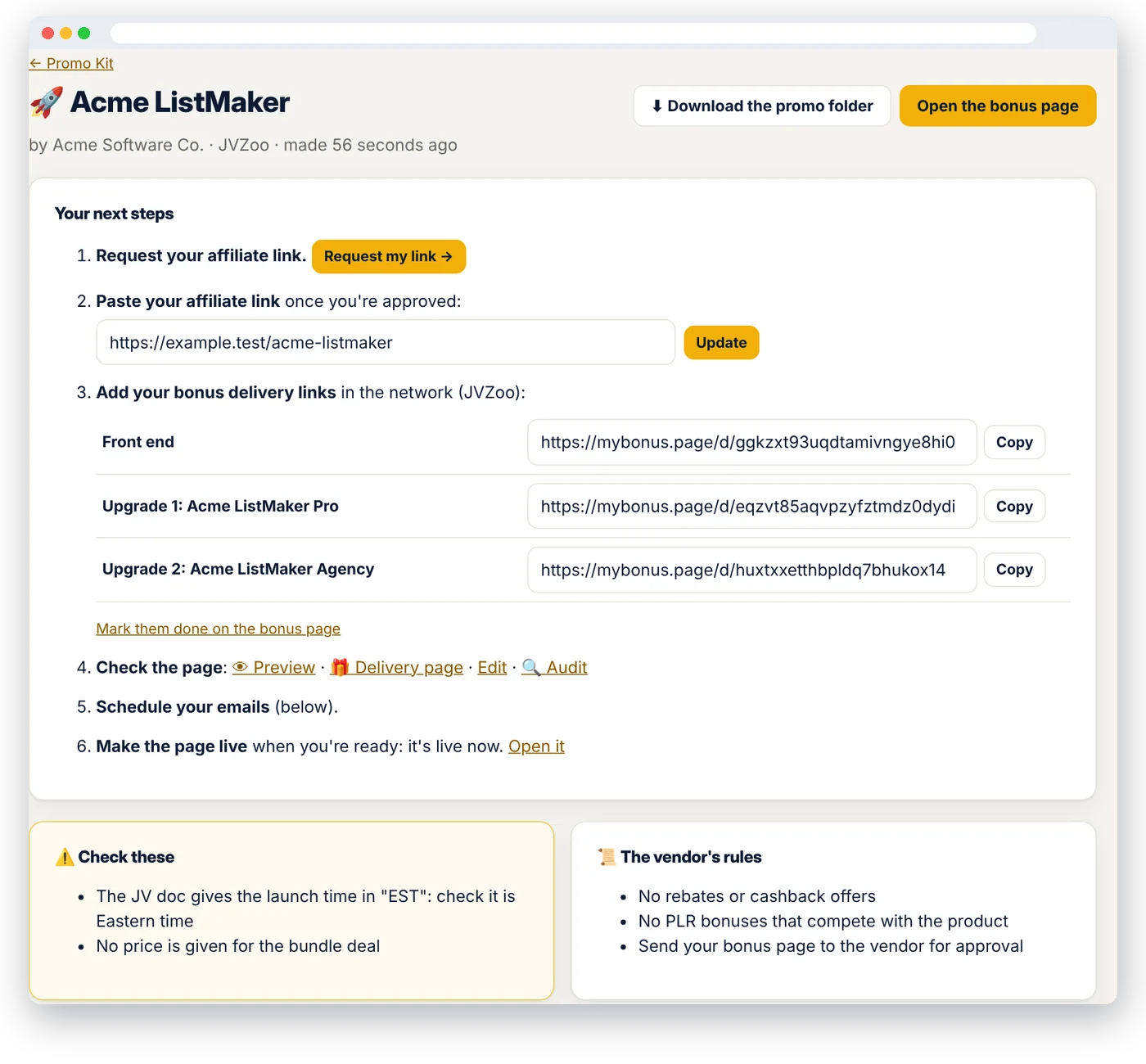
You know the drill. A vendor sends the JV page. You make a folder, download the JV docs, copy the swipes, hunt for the launch time and time zone, request your link, map out the upgrades, pick bonuses, write the emails. Two hours, every launch. Promo Kit does all of it in about three minutes.
- Collects everything into a promo folder: the JV page and every doc it links to, Google Docs and Sheets, Drive, Dropbox, Word and PDF. Download it all as one zip.
- Watches the webinar for you: upload the JV webinar replay, the VSL or the demo video (or paste its link) and it's transcribed and read with everything else.
- Finds the facts: the product, the launch start and end with the time zone, the funnel with prices and commissions, the contest, the sales page, and the link to request your affiliate link.
- Builds your bonus page, paused: the timer set to the launch end, every upgrade with its own delivery link, the best-fitting bonuses from your library, and new AI bonuses for the gaps nothing covers.
- Writes your emails: six of them, from the vendor's swipes and your bonuses, with your bonus page link already in. Send them to Kit as drafts in one click.
- Reads the vendor's rules ("no PLR bonuses", "no rebates") and warns you if your page breaks one, before you go live.
- On vacation? Forward the JV email to your private Promo Kit address, or tell your AI "here's the JV page, build the promo." It goes live at launch by itself if you ask it to.
Nothing goes live until you say so. Docs behind a login? Upload them as files.
Paste the link to your old bonus page. Get it back here, cleaned up.
Already have bonus pages in another page builder? Don't rebuild them. Paste a page's link and in a minute or two it's rebuilt here: the headline, the review video, the buy button and every bonus, with its graphic and its download text from the delivery page. Your whole library comes with it, ready for the next launch.
1. Paste the link
The bonus page, plus its delivery page if you have it. Any page builder. Or ask your AI: "Import my bonus page at…"
2. We rebuild it
Every block in the same order, every bonus saved in your library (graphic, value, download links), the page paused so you can check it.
3. Their branding stays behind
"Powered by…" badges, the old builder's legal footer, "Report this page" links and tracking are taken out. You add your own footer, once.
- Pictures move too: graphics the old builder hosted are copied to our servers, so nothing breaks when you cancel it.
- Lots of pages? We'll move your whole account for you: every page, every bonus, every category.
- Just the bonuses? Paste a list, upload a Word file or spreadsheet, or share a Google Docs, Drive or Dropbox link.
Tell the AI what you want. Get a finished bonus in a minute or two.
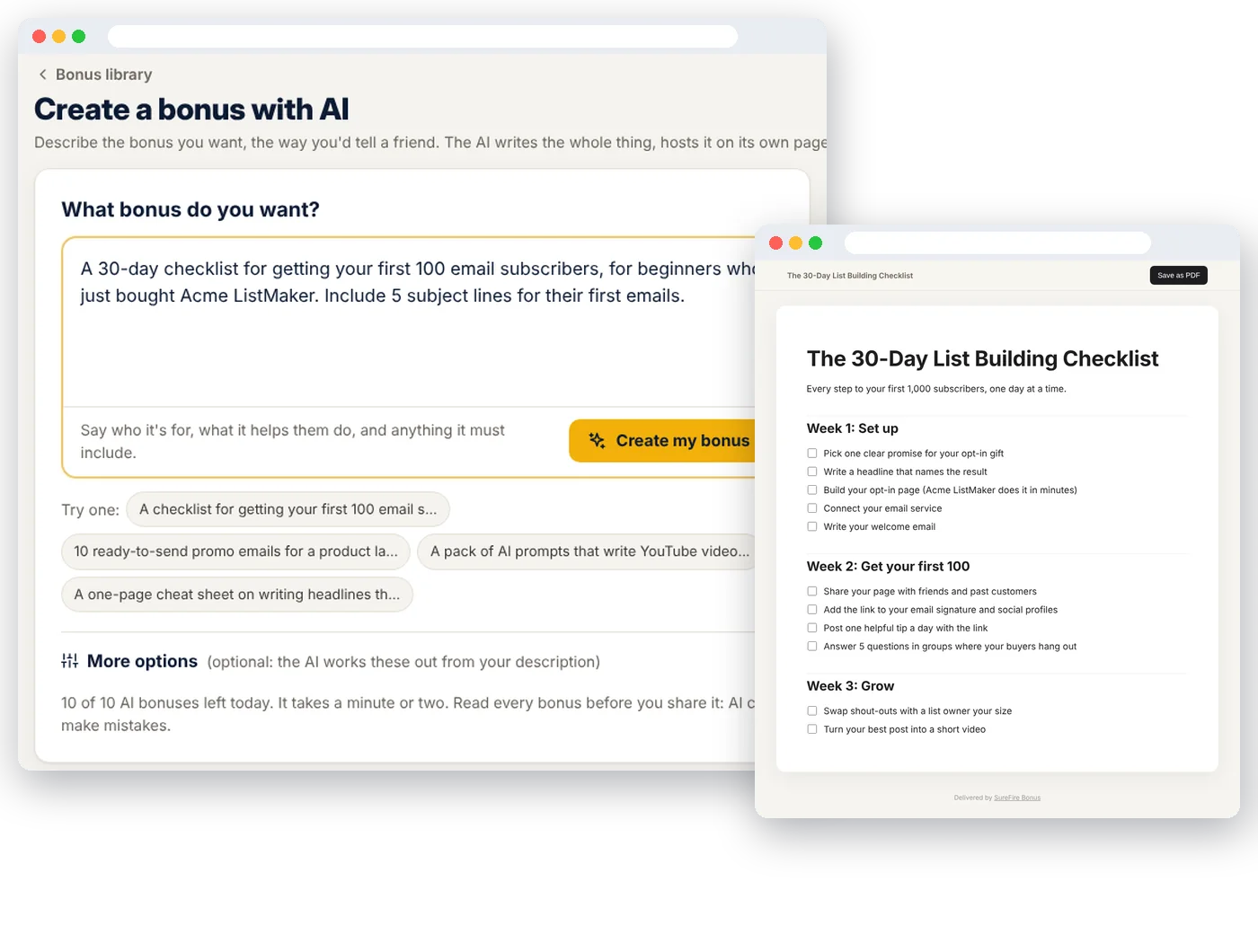
The hardest part of a bonus page has always been the bonuses. Now you type one line, like "getting your first 100 subscribers in 30 days, for people who just bought a list-building course", and the AI writes the whole thing: a real, useful bonus your buyers will actually open.
- Eight bonus types, picked for you: checklists, cheat sheets, swipe files, AI prompt packs, mini guides, action plans, templates and worksheets. The AI chooses the one that fits what you asked for, or you pick.
- Made to fit the product: tell it what the buyer just bought, and the bonus fills the gaps.
- We host it for you: each bonus gets its own clean page buyers can read or save as a PDF. No Google Drive links, no Dropbox, nothing to upload.
- The graphic, made for you: pick a style (eBook cover, bold, light or dark) and a color theme. Done in one click. Or upload your own.
- Already have bonuses? Paste a list, upload a Word file or spreadsheet, or share a Google Docs, Drive or Dropbox link. The AI reads it and sets up each bonus for you to check.
- Every word is yours to edit before anyone sees it.
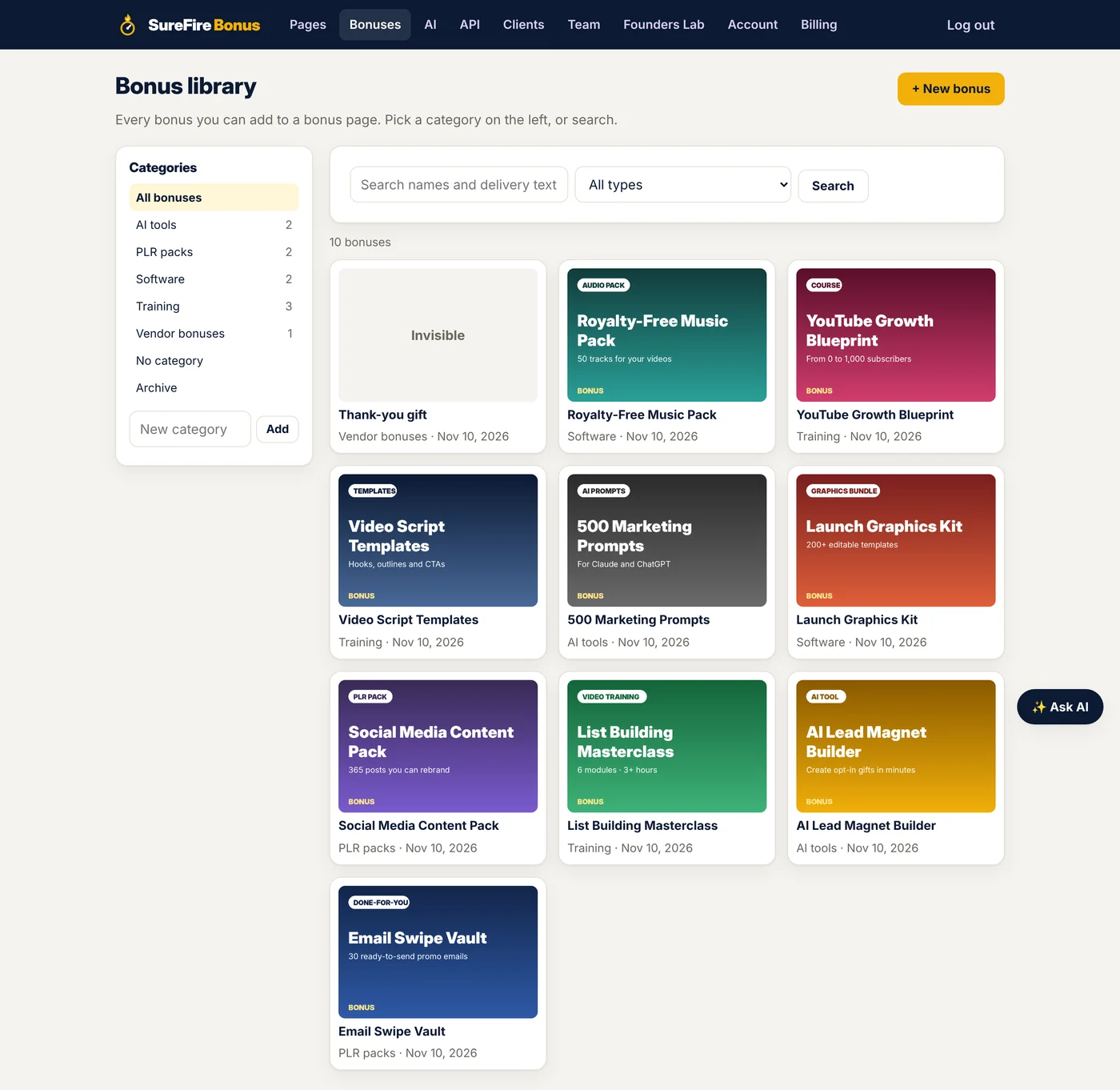
Every bonus you own, ready for the next launch
Stop rebuilding. Add a bonus once, with its graphic, value and delivery text, and drop it on any page in a couple of clicks. Change its download link once, and every delivery page that uses it updates.
- Graphic, text and invisible bonuses: show it with an image, describe it in words, or deliver it quietly as a surprise only buyers see.
- Categories and search: PLR packs, AI tools, software, training, vendor bonuses. Find the right one in seconds.
- Duplicate a bonus to make a version for a new promo, without touching the original.
- Bring your old bonuses with you: import them from a list, a file or a shared link, in minutes.
- Never lose a bonus: archive instead of delete. Pages that use it keep working, and you can restore it any time.
See your real page as you build it. Drag, drop, done.
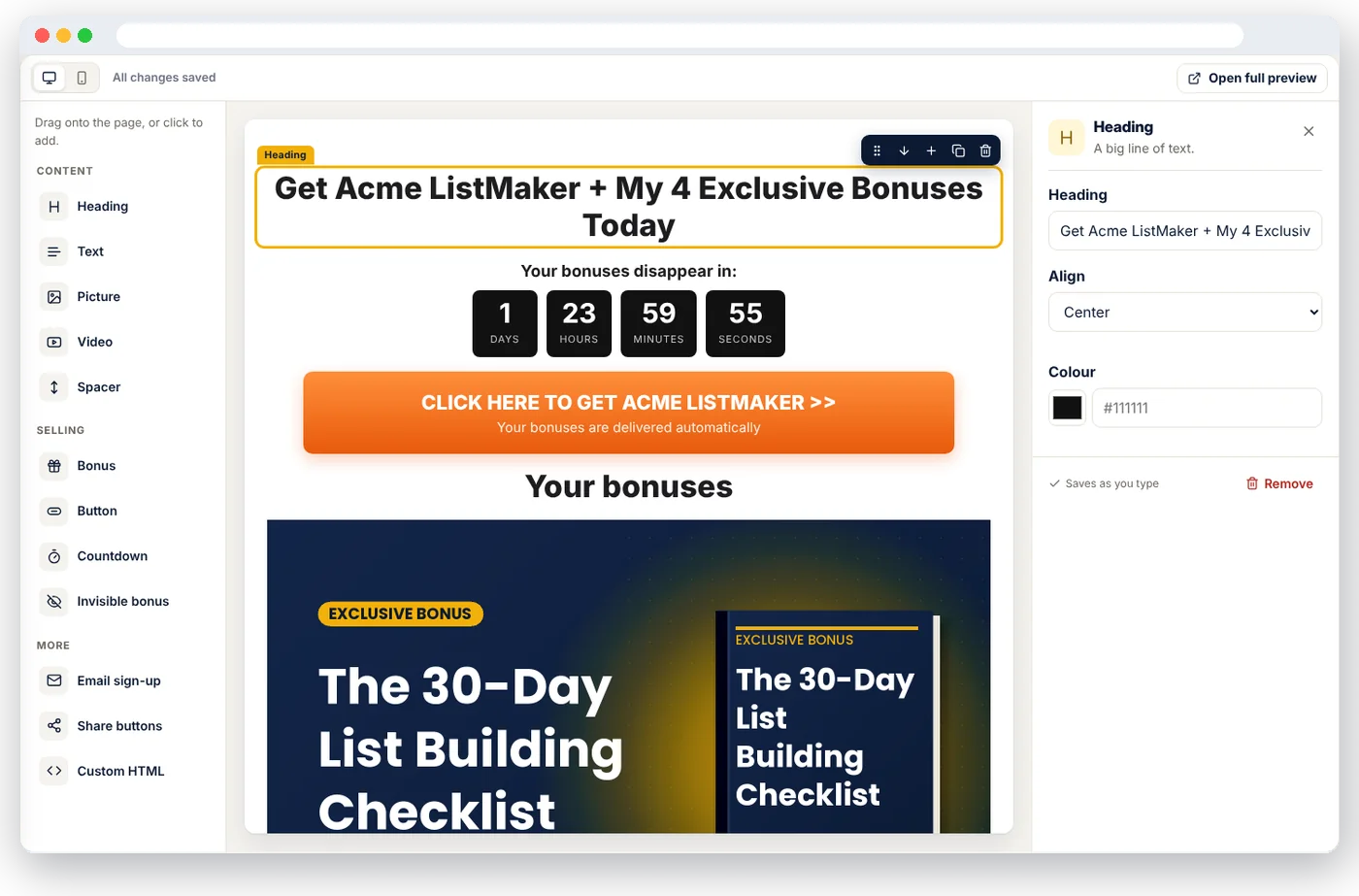
No code, no guessing what it'll look like. Your actual bonus page sits in the middle of the screen. Drag a block onto it, click anything to change it, and watch it update as you type. Check it on a phone with one click, because most of your clicks come from an email opened on a phone.
- Drag blocks exactly where you want them: heading, text, picture, video (YouTube, Vimeo, Loom, Wistia or your own file), button, countdown, bonus, invisible bonus, email sign-up, share buttons, spacer and your own HTML.
- Click to edit, saved as you type. Hover any block to move it, copy it or add one below.
- Start from a layout: Standard, Video review or Blank.
- Building and settings kept apart: the page on one tab; links, delivery, timer, MailGate and stats on their own tabs. No clutter.
- Your affiliate link on every button automatically. Give any button its own link if you like.
- A real editor for your bonuses: format delivery text like a document, start from a template (download button, login details, coupon code, video training, license key and more), or paste HTML from another tool.
- Your footer, your rules: add your own disclosure and legal links once. The "made with SureFire Bonus" footer uses your referral link if you're one of our affiliates, and you can switch it off on any paid plan or trial (Agency members show their own brand instead).
- Starts paused, so nothing goes out before you're ready. One click makes it live.
Three kinds of deadline. None of them fake.
Urgency sells, but only when it's true. Pick the countdown that fits the promo:
- Same end for everyone: counts to the launch's real cart close, in the vendor's time zone.
- Evergreen, per visitor: each person gets their own clock (say, 48 hours) from their first visit. Come back tomorrow and it hasn't reset. Perfect for pages you promote all year, in emails, ads and videos.
- Run by SureFire Deadlines: already use SureFire Deadlines? Pick a campaign, and your bonus page, emails, sales page and social posts all show the same deadline, per person. Change it once and everything follows.
- Any time zone, done right: set the end in the vendor's time zone. Daylight saving is handled for you.
- Vendor extended? +1 hour, +24 hours or +48 hours, or type a new end time. Every visitor sees it straight away.
- When time's up, you choose: hide the clock and keep the page up, or send visitors to your "deal closed" page.
- Paused pages close properly: visitors go to the page you choose, or see a simple "This offer has closed" message, never an old offer.
The money is in the list. So start building yours.
Here's the quiet problem with most bonus pages: you send the traffic, the buyer joins the vendor's list, and that's the last you see of them. MailGate flips it. Your bonuses stay locked until the visitor joins your email list. It takes them five seconds. It gives you a subscriber you can email for years.
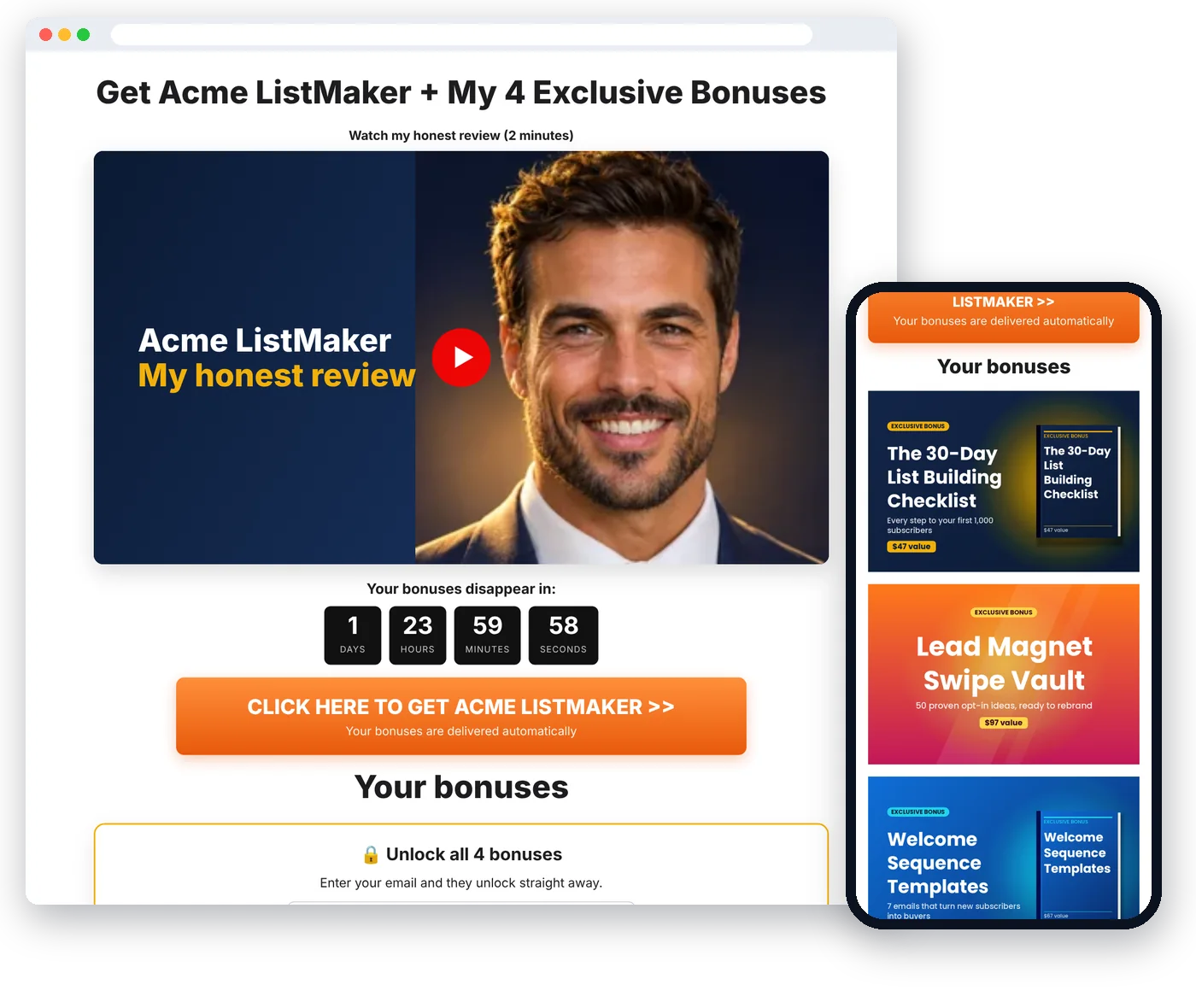
Unlock with an email
Visitors see your video, timer and blurred bonuses. One email (and first name, if you like) and everything unlocks, and stays unlocked when they come back.
Or gate the delivery page
Prefer a list of buyers? Buyers enter their email to open their bonuses. The most valuable list you can own.
Straight into your email service
Kit, Mailchimp, ActiveCampaign, GetResponse and MailerLite, with your list, sequence and tags. Anything else through Zapier, Make or Pabbly.
- Nobody gets lost: every sign-up is saved on your Leads page too. If your email service hiccups, we keep retrying.
- Download your leads as a spreadsheet any time. They're yours.
- Built for honest marketing: an optional "I agree to receive emails" box for visitors in the EU and UK, and spam-bot protection on every form.
- Or put a sign-up form anywhere on a page, without locking anything.
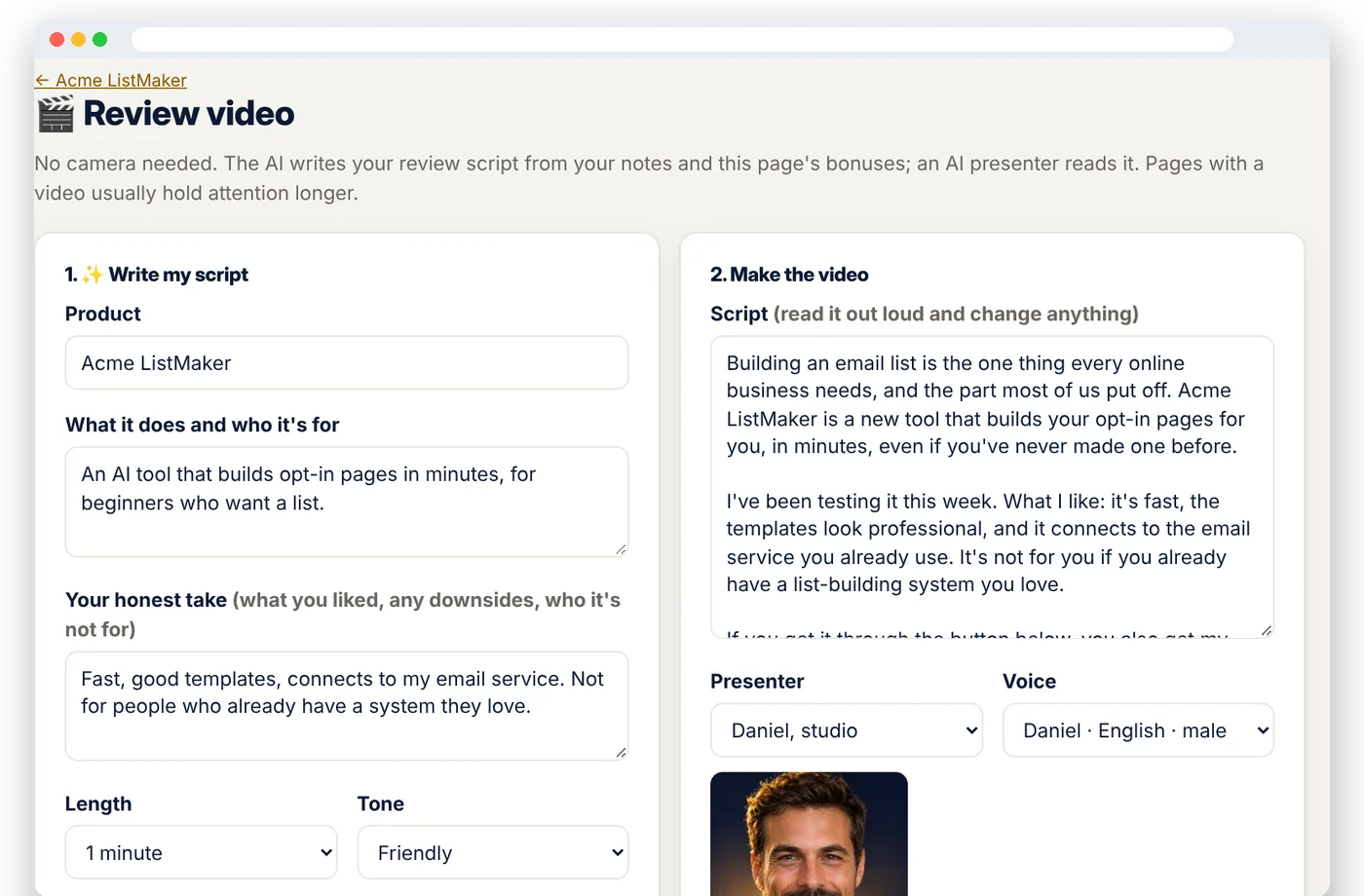
A review video on every page. No camera. No editing.
A short review video is one of the strongest things you can put on a bonus page: people buy from people. But filming one for every launch? Nobody has time. So now you don't film it.
- Jot down your honest take on the product: what it does, what you liked, who it's not for.
- The AI writes the script, 30 seconds to 2 minutes, with your bonuses worked in and a clear call to action. No hype, no income claims.
- An AI presenter reads it on camera, using your own HeyGen account: hundreds of presenters and voices, or your own photo avatar.
- It lands on your page by itself when it's ready, saved on our servers so the link never expires.
- Landscape or portrait, so the same video works on YouTube Shorts, Reels and TikTok to send traffic back to your page.
- Prefer to be on camera yourself? Take the script, record it on your phone, and drop the link in a Video block.
Bonuses delivered without lifting a finger
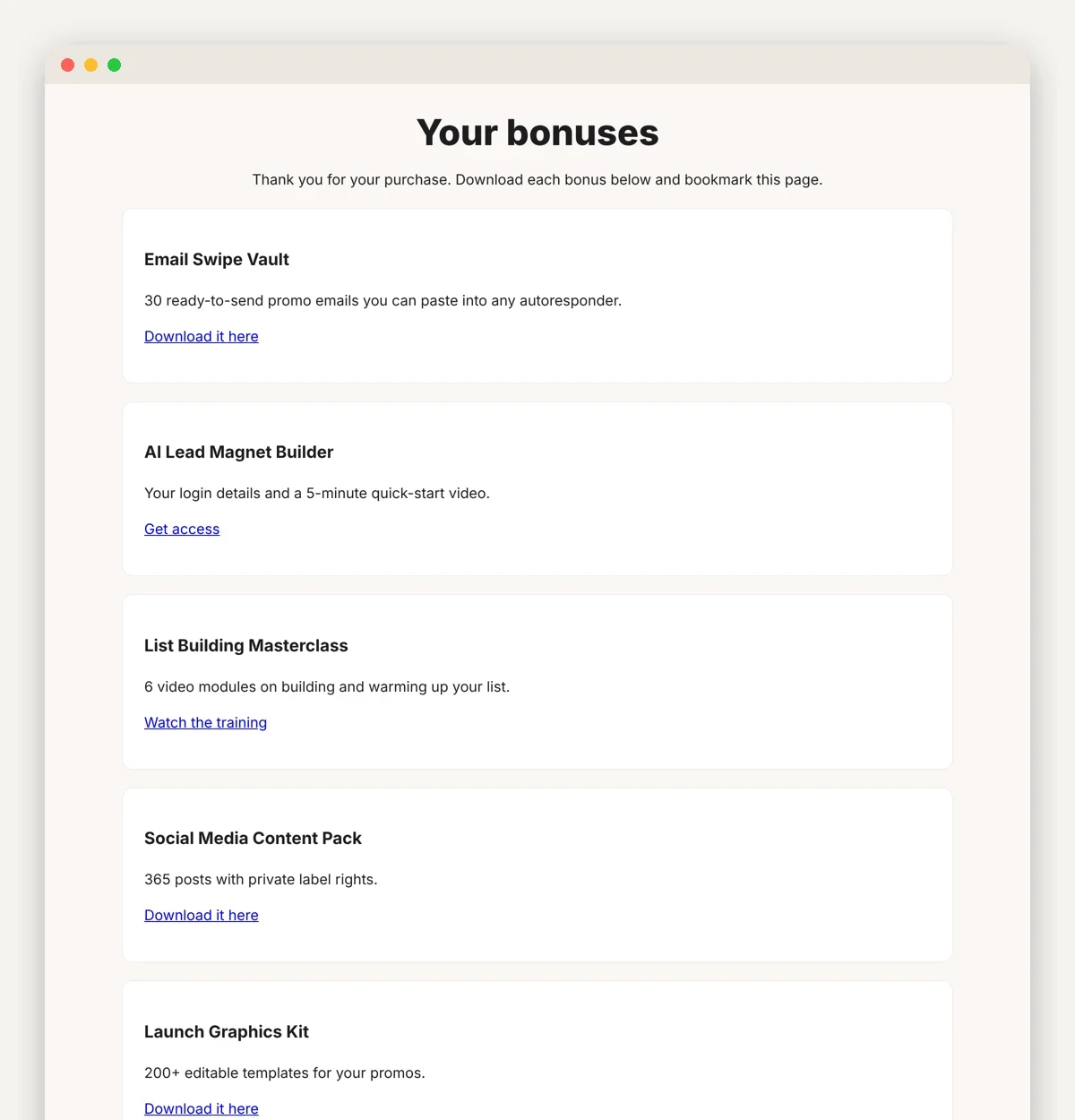
Every bonus page comes with its own private delivery page. Paste its link into the JVZoo or WarriorPlus bonus area (or your buyer follow-up email) and every buyer gets every bonus, with the download links, the moment they buy.
- Invisible bonuses only buyers see: a thank-you note, a surprise gift, a coupon code.
- Hidden from search engines, so freeloaders can't find your bonuses on Google.
- Upgrade (OTO) bonuses on the same page: list the funnel's upgrades, choose who gets each bonus, and every purchase gets its own delivery link with only its bonuses. One page for a six-step funnel, not six pages. A "Mark done" checklist makes sure every link reaches the network.
- Update once, fixed everywhere: change a download link in your library and every delivery page that uses it updates.
Short, clean links buyers trust
No hosting, no domains, no plugins needed. Every page is hosted for you on our bonus page domains, with an address you choose. Prefer your own website? Show the page there too.
- Readable addresses like mybonus.page/acme-listmaker or getmybonus.page/jeremy-acme-videopro. No random numbers and letters.
- Pick the domain per page: mybonus.page, getmybonus.page or mybonuses.page.
- Change the address later and the old link keeps working.
- On your own website too: put the live page at yoursite.com/acme-bonus with one uploaded file, or embed code for WordPress and any site builder. Still counts in your stats, and you never share your website logins.
- Kept apart from everything else and protected by Cloudflare, so your pages stay fast and up during the big launch rush.
See which page made the money. Then do it again.
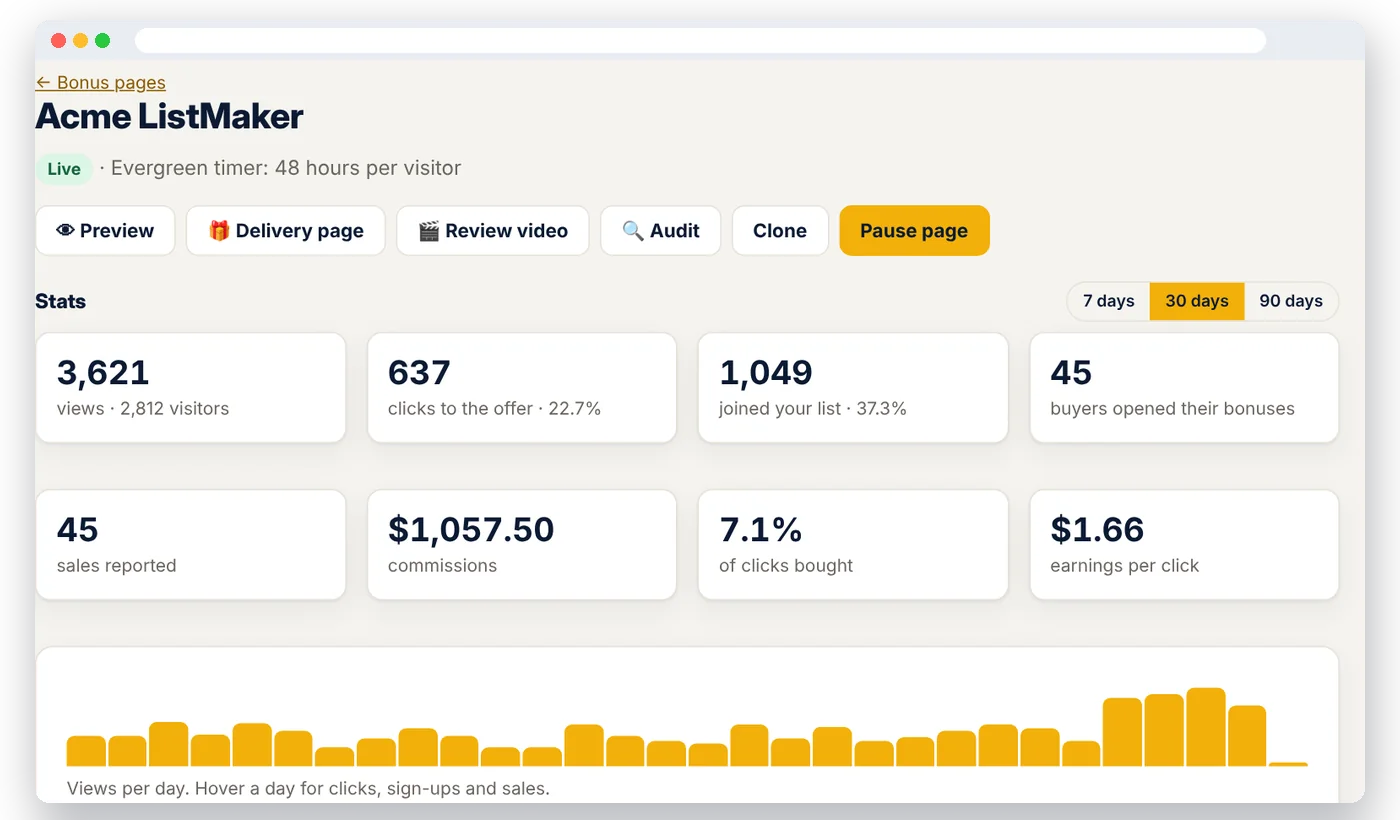
The old department-store complaint goes: "Half my advertising is wasted. I just don't know which half." Not anymore. Every page shows what happened, from the first view to the last commission, for the last 7, 30 or 90 days.
- The whole funnel, page by page: views, visitors, sign-ups, clicks to the offer, buyers who claimed their bonuses, sales and commissions.
- Sales tracking for JVZoo and ClickBank (and other networks that can send a sale notification): turn on Track sales for a page, paste your private link in your network once, and every sale is matched to the page that made it.
- The numbers that matter: conversion rate and earnings per click, so you know which promos deserve your best emails.
- Running ads? Add your Facebook (Meta), Google and TikTok pixel IDs once. They fire on every page with page views, sign-ups, offer clicks and buyers, so you can build audiences and see which ads bring buyers.
- Tracking links per source: one link for your email, one for Facebook, one for YouTube, each with its own visitors and clicks. Connect Rebrandly or Bitly and they're short, branded links in your own account.
- Clone in one click. The copy starts paused, with its own address and its own delivery page.
- Ask your AI for the numbers: "Which page got the most clicks this week?" "How did the Acme ListMaker page do this month?"
- Team access: invite your VA or partner to build pages with you, with their own login.
Plug it into the tools you already use. Once.
You already have an email service, maybe a deadline tool, an ad account and an affiliate network. Most bonus page tools make you copy and paste between all of them, on every launch. Here, you connect each one once, on one page. From then on, every bonus page you build uses them automatically.
SureFire Deadlines
One deadline, everywhere you sell. Pick a Deadlines campaign and it runs your bonus page timer. Your emails, sales page, social posts and bonus page all count down to the same moment. Extend it, or end it early, in Deadlines and every one of them follows. Evergreen campaigns too, so each subscriber gets their own deadline.
Plus its countdown bar on your bonus page, top or bottomYour email service (MailGate)
Kit, Mailchimp, ActiveCampaign, GetResponse and MailerLite, with your list, sequence and tags. Anything else through Zapier, Make, Pabbly or a webhook. Every visitor who unlocks your bonuses lands on your list.
Every sign-up also saved on your Leads pageHeyGen
Connect your own HeyGen account and an AI presenter reads the review script our AI writes for you. The video lands on your page by itself.
Hundreds of presenters and voices, or your own photo avatarYour affiliate networks
Turn on Track sales for a page and paste one private sales link into JVZoo or ClickBank (or any network with a postback): every sale is matched to the bonus page that made it.
Sales, commissions and earnings per click, per pageRebrandly or Bitly
Every tracking link you make becomes a short, branded link in your own link shortener account, made in one click by you or your AI.
One link per traffic source, with its own numbersYour ad pixels
Facebook (Meta), Google and TikTok. Paste the IDs once and they fire on every bonus and delivery page, with page views, sign-ups, offer clicks and buyers.
Build audiences, see which ads bring buyersAlready using SureFire Deadlines? This is where it gets powerful.
Here's the problem with most affiliate promos: your email says "ends Friday", your bonus page says something else, and when the vendor extends you're fixing timers in five places at midnight. Connect Deadlines and that's over. One deadline. Every email, every page, every post. Change it once.
And your AI? Connect Claude or ChatGPT in about a minute, no keys to copy, and it uses all of this for you. Everything you connect belongs to your account alone, and every key is stored encrypted.
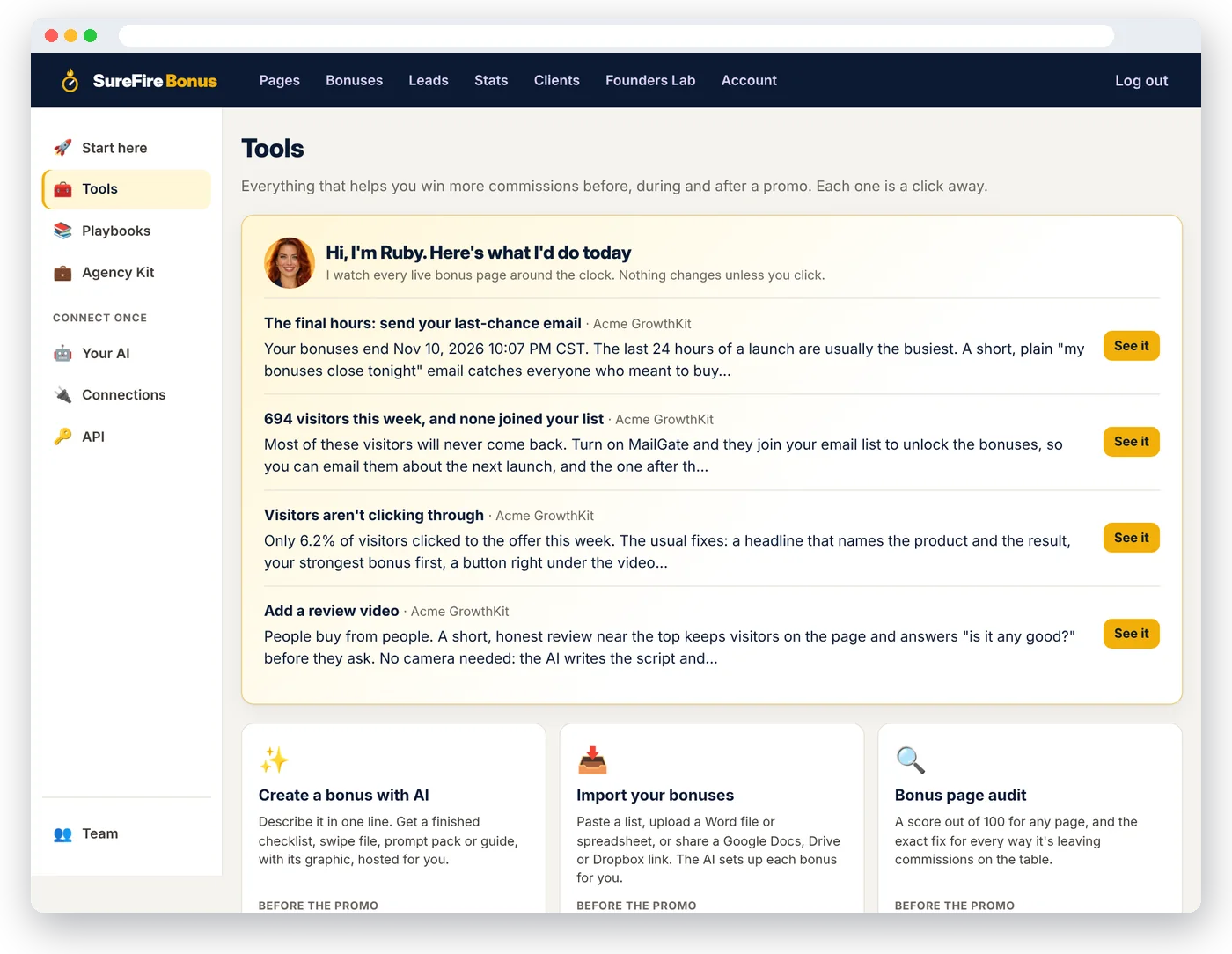
She watches your bonus pages all night. In the morning she tells you the one move that wins the commission.
Super-affiliates have someone watching every promo by the hour. Now you do too. Ruby checks every live bonus page around the clock, and the moment something needs doing, she tells you what to do, why, and gives you a button that does it.
- "Your bonuses end in 9 hours." Send the last-chance email now. Vendor extended? One click adds 24 hours for every visitor.
- "694 visitors this week, and none joined your list." Turn on MailGate before they're gone for good.
- "Only 6% of visitors clicked through." Run the audit and get the exact fixes.
- "120 clicks and no buyer has opened your delivery page." Is the link in the vendor's bonus area? Fix it before the refunds start.
- "The countdown ended, but the page is still live." Close it properly in one click.
- Nothing changes unless you click. Every tip says exactly which of your numbers triggered it, and shows at the top of the page it's about.
Three jobs you'd normally pay a launch manager for
Before the promo, during it, and after it. Each one takes a single click.
🔍 The bonus page audit
Pick any page and get a score out of 100, plus every place it's leaving commissions on the table: no review video, no button near the top, too few bonuses, a bonus nobody can download, no list building, no sales tracking. Each one comes with the exact fix, biggest wins first. A compliance check also flags income claims, scarcity that may not be true, rebates and a missing affiliate disclosure (a helper, not legal advice).
📋 The promo debrief
When a launch ends, see what really happened: visitors, clicks, sign-ups, buyers and commissions, your best day, and how this page compares with your others. Then a plain-English "next time" list worked out from your numbers, and one click to clone it for the next launch.
📊 Every page, side by side
All your bonus pages in one table: visitors, click rate, sign-ups, buyers, sales, commissions and earnings per click, best earners at the top. Know exactly which promos deserve your best emails, and which bonuses to reuse.
White label this entire platform. Put your name on it.
Everything you just saw (AI-made bonuses, bonus pages, MailGate list building, AI review videos, the autopilot coach, audits, debriefs, sales tracking and the AI that runs it all) becomes your bonus-page service. Your brand, your prices, your clients. Our name never shows up.
Run bonus pages for your clients, under your own brand
Managing affiliate promos for other people? The Agency plan turns SureFire Bonus into your service. Build every client's bonus pages from one login, and they never have to see us.
- A new service to sell: charge clients for done-for-you bonus pages and launch promos.
- One login for every client: each client gets their own separate account (like a sub-account), with their own bonuses, pages and stats. Switch between them in one click.
- 25 client accounts included. Need more? Add 25 at a time, whenever you like.
- Your brand, not ours: with white label, clients see your name, logo and color, at your own web address like app.youragency.com.
- You choose how hands-on they are: do it all for them, give them a view-only login to watch their results, or let them edit.
- AI does the heavy lifting: open a client, and Ruby, your AI bonus coach, helps with their pages right there.
- The Agency Kit: packages and prices, sales page copy, a proposal and pitch emails to win your first clients.
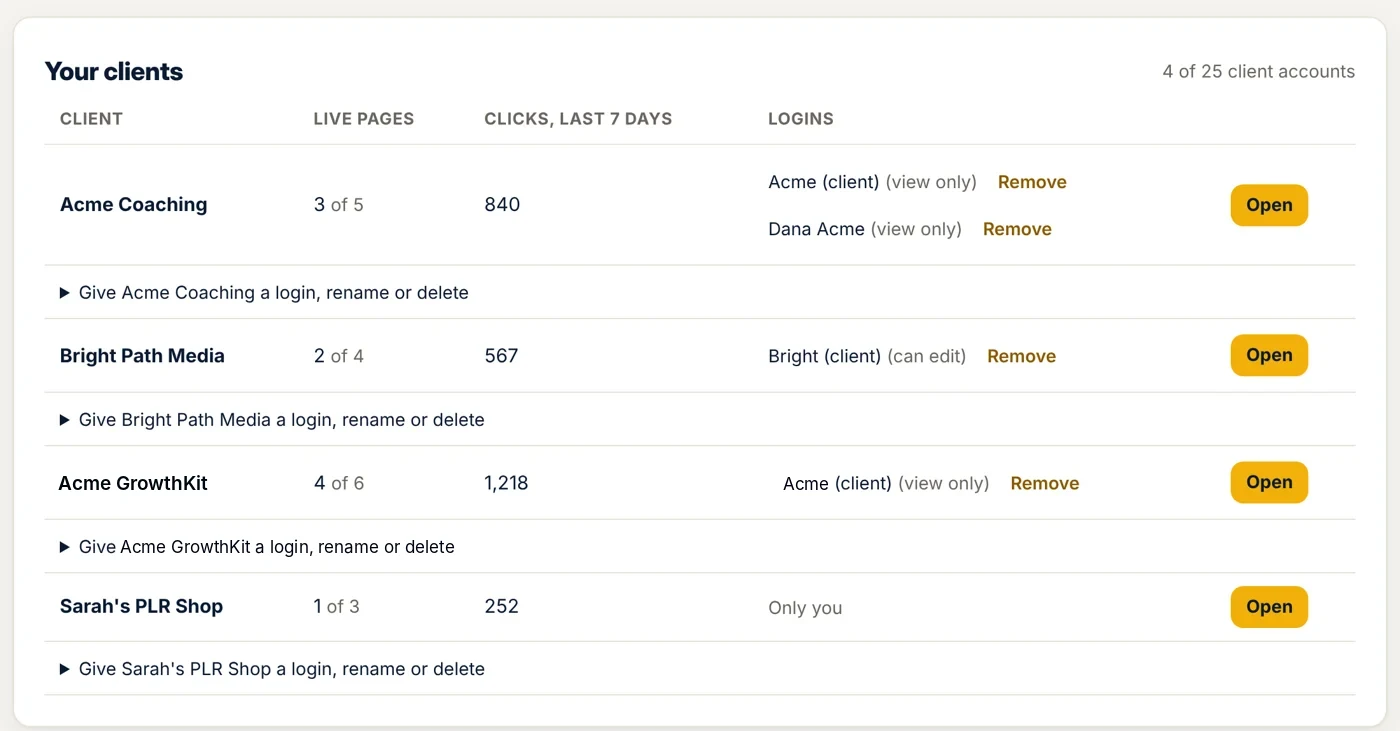
Your clients see your service. Not ours.
White label means you can present SureFire Bonus to your clients as your own service. You set your brand name, logo and color once, and that's what your clients see when they log in and in the emails they get. Call it whatever you like ("Rocket Launch Co Bonus Pages", for example) and include it in what you charge them. We run it all in the background.
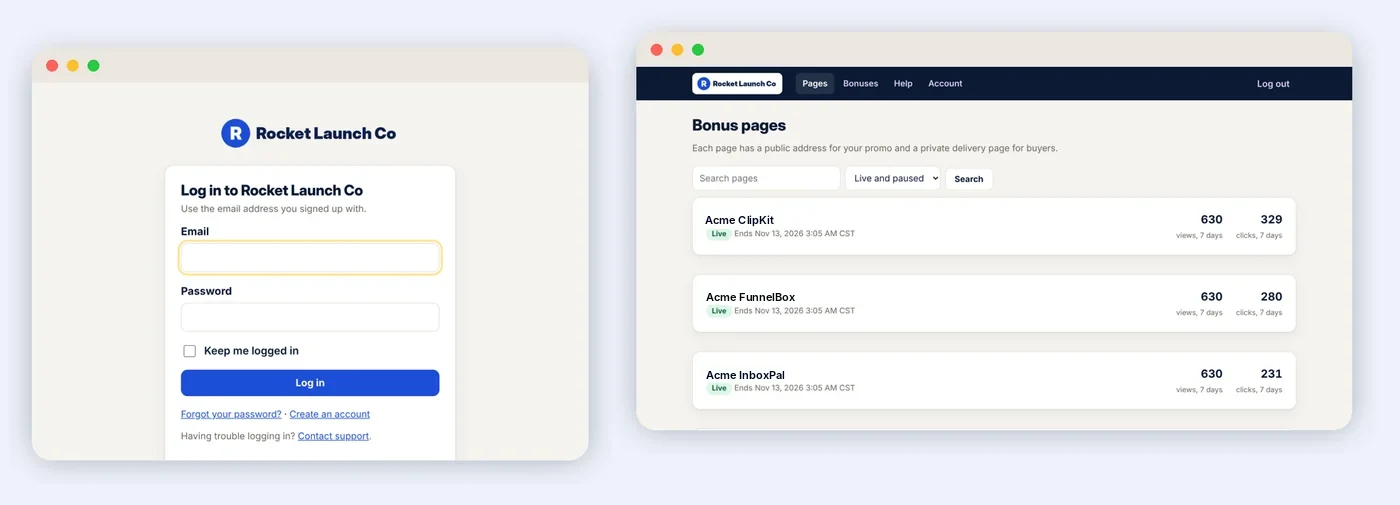
What you can brand
- Brand name: shown instead of ours everywhere your clients look
- Logo: on their login page, dashboard, browser tab and emails
- Main color: buttons and links in their dashboard
- Support email and help page: clients' "Help" goes to you, not us
- Your own web address: like app.youragency.com, where your clients log in
- Emails they get from the app (invitations, password resets): from your name, with your logo and sign-off
- Built-in AI helper: talks about your brand, not ours
- Their bonus pages and delivery pages: no "made with SureFire Bonus" line
What your clients never see
- Our name, logo or sales pages
- Your other clients, or your own agency account
- Your billing, team or affiliate settings
- Our Founders Lab and our AI connector
Good to know
- You see the normal app when you work in a client's account, so you always know where you are.
- Clients log in at your own web address, or through your branded login link. Setting up your address takes one DNS record (we show you exactly what to add). We do the rest, including the secure https certificate.
- You can charge clients whatever you like for your services. What's not included is reselling the software itself as standalone subscriptions to the public.
One separate account per client, all from your login
Each client gets their own account inside yours, like a sub-account. Their bonus library, pages, delivery pages and stats stay completely separate from yours and from every other client's.
Add a client
Open Clients, type their business name and click Add client. You're straight into their new account.
Build their pages
Add their bonuses, make a page for each launch they promote, and paste their affiliate links. Or ask Ruby, your AI bonus coach, to help.
Share results your way
Send them reports yourself, or give them a branded login: view only to watch their stats, or can edit if they help.
Founders don't just buy it. You help build it.
Founders pricing is low for a reason. We want you using every feature on real launches and telling us what to fix and what to build next. Inside your account is the Founders Lab: a direct line to the dev team.
We've been affiliate marketers for 20 years. Over that time we've tried just about every bonus tool out there. And lately, most of them have gotten outdated. They don't work with AI, or they're so complicated you need an afternoon just to make one page.
So we finally decided to build our own, and to build it AI-first.
Here's why that matters. In affiliate marketing, speed to market is everything. A launch pops up in two days. You're short on time. Maybe you're on vacation. You need a promo out today, and there's no time to build a bonus page. Now there is. You just tell your AI what you want, "make a bonus page for this launch with my best list-building bonuses," and it's done: the page, the countdown, your affiliate link and the delivery page. From your phone, in a couple of minutes.
Speed doesn't mean cutting corners, either. Every page comes out clean, fast and built to win the commission, because quality matters as much as speed. You can still build everything by hand if you like. You just don't have to.
As we head into 2027, I want every affiliate who uses SureFire Bonus to have the best tool possible for creating bonuses with their AI. That's the whole point. That's why we built it.
Here's the deal. We're opening the doors to our own audience first and asking you to help us build it. You might spot a bug or two, or a feature you wish it had. Tell us in the Founders Lab and we'll fix it or build it. In return, you get our Founders price, plus 50% off for Black Friday (for as long as you stay subscribed, or off the one-time price), and a seat in the Founders Club, where your ideas decide what we build next.
- Our Founders price plus 50% off with code BLACKFRIDAY50 (applied for you): forever on monthly or annual, and off the one-time price too, until Monday, November 30
- A tool that's simple today and gets better every week, shaped by you
- A direct line to the people building it, not a support queue
- Your AI does the busy work, so you can get back to promoting
Thanks for being here at the start. Let's build it together.
— Jeremy & the SureFire team
Report a bug in 30 seconds
It goes straight to the developers, not a support queue, and you'll see when it's fixed.
Shape what we build next
Suggest a feature or a better way to do something. We review every idea, and reply right in your account.
Your Founders price, locked in
Your price doesn't go up while you stay a member, even when prices rise for everyone else.
Every update included
Every fix and new feature lands in your account automatically. Nothing to download.
The Bonus Playbooks
A tool builds the page. The Playbooks tell you which bonuses to offer, what to send, when to send it, and exactly what to say. 12 affiliate promo playbooks with 16 ready-to-send emails, plus 3 network guides, inside your account.
Never stare at a blank email again
- The 5-day launch promo, written for you. What to build before the cart opens, the emails for day one, the middle and the final 24 hours, and what to do when the vendor extends.
- Pick bonuses that win the sale. How to find the gaps in a product and fill them, so buyers pick your link over everyone else's.
- The bonus page that converts. The layout, headline formulas and bonus copy, top to bottom.
- Build your list on every promo, with the 3 emails to send new subscribers.
- Evergreen offers, upgrade (OTO) bonuses, YouTube reviews, webinars, Black Friday and New Year launches.
- Plus Platform guides for bonus delivery and sales tracking on JVZoo, ClickBank, WarriorPlus, Digistore24 and other networks.
- Hand any playbook to your AI. Each one comes with a ready-made request: your AI builds the page and writes the emails for your promo.
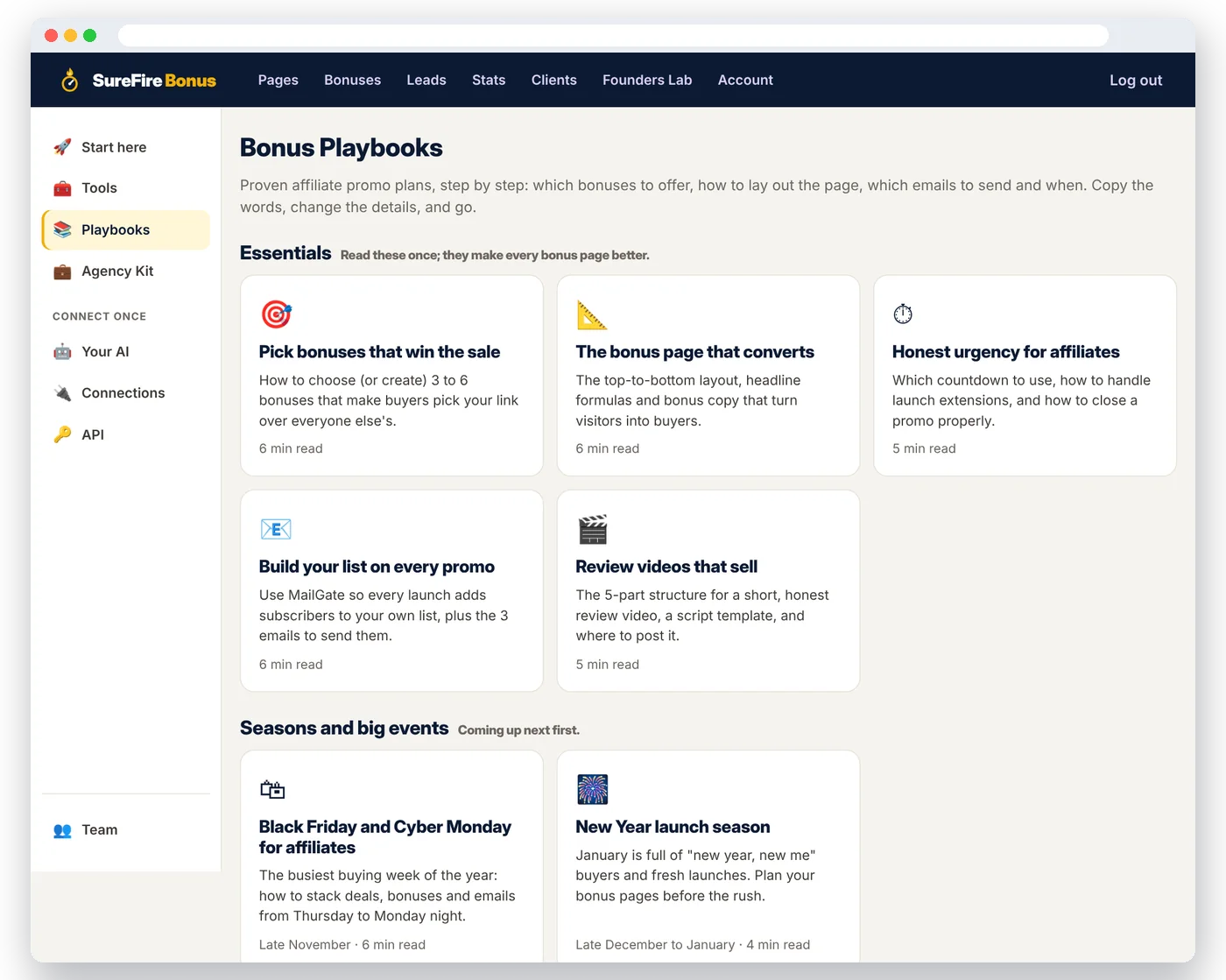
Most affiliates buy a page builder and still don't know what to offer or what to say. Founders get both: the system that builds and runs your bonus pages, and the playbooks that fill them with buyers.
The Super Affiliate Launch Playbook
The Bonus Playbooks above cover one kind of promo each. This is different: the whole system top affiliates run on every launch, from picking the launch to growing your list after it, in one playbook you work through start to finish.
Promote like the names on the leaderboard
- Pick launches that pay. A 7-point scorecard so you stop wasting launches on products that don't convert.
- Get approved, get access, get your coupon. What vendors look for, plus the exact message to send them.
- The gap method for bonus stacks that make buyers choose your link over everyone else's.
- The day-by-day promo, from the week before cart open to the last hour.
- Play JV contests smart, and turn every launch into a bigger buyer list for the next one.
- A 30-day plan you tick off, so it becomes a habit, not a one-off.
Launch Radar: find a launch, get a finished bonus page in one click
Every upcoming JVZoo, WarriorPlus and ClickBank launch worth promoting, in one calendar that fills itself every hour. Spot a winner, click once, and your bonus page is built, with bonuses written for that exact product.
See every launch worth promoting
When each cart opens, the price, the commission and the JV page, by week or on a calendar. Filter by network and niche. Big launches are flagged.
Click "Make my bonus page"
The page is built with the product name, a countdown to the launch close and the JV info saved. (Close date not published yet? The countdown is set to the usual close and flagged, so you check it before you go live.) Our AI writes 3 bonuses made for that product, each with a graphic, and puts them on the page.
Add your link and go live
Paste your affiliate link and you're promoting, while other affiliates are still opening their page builder. Add the launch to your calendar so you never miss cart open.
Anyone can browse the calendar. Every plan includes the one-click bonus page.
Evergreen Offers: get paid every month, not just on launch day
Launches pay big for a week, then go quiet. Evergreen Offers fills the gaps: affiliate programs you can promote any day of the year, many paying every month the customer stays. Pick one, click once, and your bonus page is built.
See what each program really pays
Email, hosting, SEO, AI tools and more: what you earn, whether it's recurring, the cookie length and the payout. We check every program on its own affiliate page every week, so the numbers are today's, not last year's.
Click "Make my bonus page"
The page is built with a countdown that starts fresh for each visitor, so the urgency is real every day of the year. The program details are saved, and our AI writes 3 bonuses made for that product.
Put it to work for years
Join the program, paste your affiliate link, and drop the page into your welcome emails, blog posts and videos. One recommendation, and every customer who stays can pay you again each month.
Anyone can browse the list. Every plan includes the one-click bonus page.
One tool replaces a pile of them
50% off ends Cyber Monday at midnight
Why so generous? We're new, and we'd rather have a few hundred happy founding members telling their friends than spend it on ads. So until Monday, November 30 at 11:59 PM Hawaii time (HST), you get every feature at our Founders price, plus 50% off.
Black Friday Founders deal: 50% off with code BLACKFRIDAY50, applied for you. Monthly and annual stay at that price for as long as you're a member. Ends Monday, November 30 at 7:59 PM Hawaii time.
🎉 50% off forever with code BLACKFRIDAY50, applied for you at checkout. Pick a plan, then choose monthly, annual or pay once.
Bonus pages for your own affiliate promos
Everything on this page, for the launches you promote yourself:
- Unlimited bonus pages and a bonus library you reuse on every launch
- Create a bonus with AI, the graphic maker, bonus hosting and the bonus importer
- Real, evergreen or SureFire Deadlines timers, with one-click extend
- MailGate list building: Kit, Mailchimp, ActiveCampaign, GetResponse, MailerLite or any app
- AI review videos (with your HeyGen account), video and share blocks
- Automatic bonus delivery, invisible bonuses and upgrade (OTO) bonuses
- Stats and sales tracking: sign-ups, sales, commissions and earnings per click
- Facebook (Meta), Google and TikTok pixels
- Ruby, your autopilot coach, plus the page audit and promo debriefs
- 15 Bonus Playbooks with the emails written for you
- AI built in: connect Claude or ChatGPT, the Bonus Skill and Ruby, your AI bonus coach
- Hosted for you on short, readable web addresses, with team access and the Founders Lab
- No client work: no commercial rights, client accounts or white label
Run bonus pages for your clients, under your brand
For anyone who runs affiliate promos for other people: agencies, launch managers, copywriters, VAs and coaches.
Everything in the regular plan, plus:
- Commercial rights: use it for client work and charge for your services
- Includes 25 client accounts, each fully separate, with its own bonuses, pages and stats
- Full white label: your name, logo, color and own web address on your clients' login, dashboard and emails, and no mention of us on their bonus pages
- Client logins so clients can see their own pages and results
- Or do it all for them: run every client's pages yourself and switch between clients in one click
- The Agency Kit: packages, prices, sales page copy and pitch emails to win clients
Start free for 14 days on a monthly or annual plan (nothing to pay today), or pay once and own it with no rebills, ever, with your discount already applied. Every plan has a 30-day money-back guarantee.
Try it on your next launch. Love it, or get your money back.
Monthly and annual plans start with a 14-day free trial: nothing to pay today, and you can cancel from your Billing page before it ends. After that, if you're not happy for any reason, email us within 30 days of your first payment and we'll refund you. No hoops.
Good questions, straight answers
New to AI, connectors or skills? No problem. Everything is explained here in plain English.
The big questions
Can't I just ask ChatGPT or Claude to make me a bonus page?
You can, and you'll get a file with your bonuses listed. But then you still need to host it, add a real timer, move the timer when the vendor extends, deliver the bonuses to every buyer, and do it all again for the next launch. SureFire Bonus is that whole system, ready in minutes, and your AI can run it for you.
Does it work with JVZoo, WarriorPlus, ClickBank and Digistore24?
Yes. Put your affiliate link on the page, and paste the delivery page link into the vendor's bonus delivery area (or your buyer follow-up email for platforms without one).
I already use another bonus page tool. Why switch?
Speed, AI and list building. Your AI can build a whole bonus page from one message, AI makes new bonuses for you, MailGate grows your list, an AI presenter records your review video, and you see sales per page. And you don't start over: paste the link to any of your old bonus pages and it's rebuilt here, bonuses and all, with the old builder's branding taken out. Or import just the bonuses from a list, a file or a shared link.
What does Promo Kit actually do with a JV invite?
Paste the JV page link (or forward the email). It saves the JV page and the docs it links to in a promo folder, reads them with AI, and gives you the facts: launch dates and time zone, funnel, commissions, the link request page, the vendor's rules and the swipes. Then it builds a paused bonus page with the timer, the upgrades and bonuses that fit, and writes six emails. You check it, paste your affiliate link, and go live when you're ready. Everything the vendor gave you (JV doc, JV page, dates, links, notes and files) stays on the page's Vendor assets tab, so you never dig through your inbox for it again.
The product has four upgrades. Do I need five bonus pages?
No. One page. List the upgrades, choose which purchase gets each bonus, and every purchase gets its own delivery link that shows only its bonuses. Paste each link on that product in JVZoo, WarriorPlus or PayKickstart and buyers get the right bonuses automatically.
Do I need hosting or a website?
No. Your bonus pages and delivery pages are hosted for you. Just share the links.
Is the timer real, or does it reset?
It's real. With "same end for everyone", every visitor sees the launch's real end time. With an evergreen timer, each visitor gets their own clock from their first visit, and it doesn't reset when they come back. When it's over, the page hides the timer or sends visitors to your "deal closed" page, whichever you choose.
I'm not technical. Will I actually be able to use this?
Yes. You type, pick and paste links. Your first page starts with a ready layout, and Ruby, the AI bonus coach in your account, walks you through anything in plain English.
I'll just wait and buy after Black Friday.
You can, but the 50% Black Friday discount ends Monday, November 30 at 11:59 PM Hawaii time (HST), and the busiest launch week of the year happens before then. Founders who join now keep their discounted price for as long as they stay members.
Is there a free trial?
Yes. Every monthly and annual plan starts with a 14-day free trial. A card is required, nothing is charged today, and we email you a reminder 3 days before it ends. Cancel from your Billing page before then and you pay nothing. Any discount code you use applies when your plan starts. One-time (lifetime) plans don't have a trial; they have the 30-day refund instead. One free trial per person.
Is there anything else to buy?
Nothing you need. Your plan includes everything on this page. There are a few optional extras: the Launch-Ready Bonus Vault (100 done-for-you bonuses in 10 niches, offered once after you start, for a single payment), more client accounts on the Agency plan, and AI review videos, which use your own HeyGen account and its credits. Skip them all and your plan works the same.
What if it doesn't work for me?
Then you don't pay. Start with the 14-day free trial on a monthly or annual plan and cancel before it ends. And if you're not happy for any reason after paying, email us within 30 days of your first payment and we'll refund you.
Bonuses, pages and delivery
What kinds of bonuses can I add?
Graphic (an image on the page, the most common), graphic + text (the image with a short description under it), text only (a headline and description instead of an image), and delivery page only (invisible on the bonus page, delivered only to buyers: thank-you notes, surprise gifts, coupons). The bonus editor shows a live preview of how each one looks, and every bonus has its delivery text with the download link.
What if the vendor extends the launch?
Click +1 hour, +24 hours or +48 hours on your page (or ask your AI), and the timer moves for every visitor at once.
How do buyers get their bonuses?
Every bonus page has a private delivery page listing every bonus with its download details. Paste its link into the vendor's bonus delivery area, and buyers get it after they buy. It's hidden from search engines.
Can I give different bonuses for upgrades (OTOs)?
Yes, on the same page. List the upgrades, choose which purchase gets each bonus, and each purchase gets its own private delivery link with only its bonuses. Paste each link on that product in the network.
Can I bring my pages from another page builder?
Yes. Paste a bonus page's link (and its delivery page) and it's rebuilt here, paused, with every bonus saved in your library. The other builder's branding and legal footer are removed, and its pictures are copied to our servers. Lots of pages? We'll move your whole account for you.
Can I paste in HTML?
Yes. The bonus editor has a Source button: paste HTML from another tool, or copy it out. There's also a Custom HTML block for the page.
What will my page address look like?
Short and readable, like mybonus.page/acme-listmaker. You choose the domain (mybonus.page, getmybonus.page or mybonuses.page) and the words: your name, the product or the promo. If you change it later, the old link keeps working.
Can I put my bonus page on my own website?
Yes. Each page can also show on your own site, like yoursite.com/acme-bonus: download one file and upload it to a folder (FTP or your host's file manager), or paste the embed code into WordPress or any site builder. It stays live with your edits, timer and tracking, and still counts in your stats. You never give us your website logins, and your AI assistant can set it up for you if it already has access to your website.
Can my VA or team help?
Yes. Invite them from the Team page as "Can edit" or "View only". They log in with their own details and never see your billing or API keys.
AI bonuses, list building, videos and tracking
Are the AI-made bonuses any good?
They're specific and practical: checklists, swipe files, prompt packs, action plans and more, written for the product your buyer just got. Read every bonus before you share it (AI can make mistakes) and edit anything you like. There's a daily limit on AI bonuses so it stays fast for everyone.
Where are my bonuses hosted?
On our servers. Each AI-made bonus gets its own private page that buyers can read or save as a PDF, and your graphics and files are stored with your account. No Google Drive or Dropbox links that break or get shared around.
Which email services does MailGate work with?
Kit (ConvertKit), Mailchimp, ActiveCampaign, GetResponse and MailerLite, with lists, sequences and tags where the service has them. For anything else, use a webhook with Zapier, Make, Pabbly or your own app. Every sign-up is also saved on your Leads page.
Won't locking the bonuses cost me sales?
You choose. Lock the bonuses on the page, gate only the delivery page (so only buyers join), or leave MailGate off and add a sign-up form anywhere. Many affiliates find a list of interested visitors or buyers worth far more than the few seconds it asks of them, but test it on your own audience.
Which tools does it connect to?
SureFire Deadlines (timers), Kit, Mailchimp, ActiveCampaign, GetResponse and MailerLite (MailGate), Zapier, Make, Pabbly or any app by webhook, HeyGen (AI review videos), Rebrandly and Bitly (tracking links), JVZoo, ClickBank and any network with a postback (sales tracking), Facebook (Meta), Google and TikTok pixels, and Claude or ChatGPT (your AI), plus an API. You connect each one once on your Connections page.
Do I need SureFire Deadlines?
No. Fixed and evergreen timers are built in. SureFire Deadlines is our separate deadline tool: if you use it, connect it and your bonus pages share the same deadline as your emails, sales pages and social posts.
What do AI review videos cost?
The script is included. The video is made with your own HeyGen account and uses your HeyGen credits, so you pay HeyGen directly for what you use. No HeyGen account? Use the script and record it yourself.
Which networks does sales tracking work with?
Turn on Track sales from this page in a page's settings, and we add a tracking ID to your affiliate link for you. Then add our sale notification link to your network once: JVZoo and ClickBank have step-by-step instructions on your Connections page. Other networks work too if they can send a sale notification (often called a postback or IPN) to a link.
Can I add my Facebook pixel?
Yes. Paste your Meta (Facebook) pixel ID, Google tag and TikTok pixel ID once. They load on your bonus and delivery pages and report page views, sign-ups, offer clicks and buyers. Turn them off for any single page. Using another network (Pinterest, LinkedIn, Snapchat, X, Bing) or a chat widget for your own AI agent? Paste its code once and it runs on every live page once you're on a paid plan (your own code is switched off during the free trial; the Meta, Google and TikTok pixel IDs work from day one).
Getting started, the coach and the playbooks
Where do I start once I'm in?
Open Start here in the left menu. It's a short checklist (fill your bonus library, make your first page, connect your email service, make it live, set up delivery and sales tracking) and most steps tick themselves off as you go. Ruby, the AI bonus coach in the corner, answers any how-to question in plain English.
What does Ruby, the autopilot coach, actually do?
She checks every live bonus page around the clock using your own numbers, and when there's a move worth making she tells you what it is, why you're seeing it, and gives you a button that does it: send your last-chance email in the final hours (it's already written for you), add 24 hours when the vendor extends, show your real claim count once people are claiming, turn on MailGate when visitors aren't joining your list, fix a page nobody's clicking, add a review video, set up sales tracking or check your delivery link. Nothing changes unless you click.
What's the bonus page audit?
A score out of 100 for any page, with the exact fix for each thing that's missing (headline, review video, countdown, button placement, number of bonuses, graphics, delivery, list building, sales tracking and more), biggest wins first. Plus a compliance check that flags income claims, scarcity that may not be true, rebates and a missing affiliate disclosure (a helper, not legal advice).
What are the Bonus Playbooks?
Step-by-step affiliate promo plans inside your account: which bonuses to offer, how to lay out the page, and the emails to send, ready to copy. There are 12, from the 5-day launch promo and evergreen offers to Black Friday, with 16 emails written for you, plus 3 guides for JVZoo, ClickBank and other networks. They're included with every plan.
What do I promote between launches?
Evergreen Offers: a list of affiliate programs you can promote any day (email marketing, hosting, SEO, AI tools and more), with what you earn, whether it's recurring, the cookie length and a link to the terms. We check every program on its own affiliate page each week. One click builds the bonus page with a countdown that starts fresh for each visitor, plus 3 AI bonuses for that product. Anyone can browse the list.
Agencies and white label
Can I use it for my clients?
Yes, with the Agency plan. The regular plan is for your own promotions only. The Agency plan adds commercial rights (use it for client work and charge for your services), a separate account for each client, white label and client logins. Pick "For agencies" in the pricing section.
What does "white label" mean?
It means you can present SureFire Bonus to your clients as your own service. Your clients see your brand name, logo and color on their login page, their dashboard and the emails the app sends them, and their bonus pages and delivery pages don't mention us. You can name it whatever you like and include it in what you charge them.
Exactly what can I rebrand?
Your brand name, logo, main color, and the support email or help page your clients use. These show on your clients' login page, their dashboard (logo, colors, browser tab, help link), invitation and password emails, and the built-in AI helper. You can also use your own web address, like app.youragency.com: add one DNS record, and your clients log in there. Their bonus pages and delivery pages never mention us.
What's in the Agency Kit?
Everything you need to sell bonus pages as a service: three packages with suggested prices, ready-to-use sales page copy, a one-page proposal, pitch and follow-up emails, an onboarding checklist and a monthly report template. It's in your account, for Agency members only.
How do client accounts (sub-accounts) work?
Each client gets their own separate account inside yours, with their own bonus library, pages and stats. You add clients on the Clients page and switch between them in one click. The Agency plan includes 25 client accounts.
Can I add more than 25 clients?
Yes. On the Clients page, add 25 more any time: $27/month or $197/year if you pay monthly or yearly, or $297 one-time if you paid once. Add as many packs as you need. Monthly and annual packs can be removed later.
Do my clients have to log in?
No. You can run everything for them and just share results. If they want to see their own numbers, give them a branded login: view only or can edit. A client login only ever sees that one client's account.
Can I resell SureFire Bonus as my own software?
You can brand it as your service and charge your clients whatever you like for your work. What isn't included is selling the software itself as standalone subscriptions to the public. If that's something you need, tell us in the Founders Lab.
AI, connectors and skills, explained simply
What are the "AI tools" in SureFire Bonus?
There are three, and all of them are optional:
- Ruby, your AI bonus coach: a help button on every page of your account. Ask "How do I add an invisible bonus?" and get the exact steps. It's included; you don't need your own AI account.
- The AI connector: lets the AI assistant you already use (Claude or ChatGPT) work inside your SureFire Bonus account for you.
- The Bonus Skill: teaches your AI how to pick bonuses, write bonus copy and lay out a page like a pro.
What is an "AI connector" (MCP), in plain English?
Think of it as a secure plug between your AI assistant and an app. Normally, ChatGPT or Claude can only talk; it can't touch your tools. Once you connect SureFire Bonus, you can type "Make a bonus page for Acme ListMaker with my list-building bonuses" and your AI actually builds it in your account. "MCP" is just the name of the open standard these plugs use, the way "USB" is the name for the plug on your laptop.
How do I connect my AI? Do I need an API key?
No API key needed. In your account, open AI → Connect your AI and copy your connector address. Add it to Claude or ChatGPT as a custom connector (the steps for each are on that page), then log in when asked and click Allow. It takes about a minute. Your AI app's plan needs to support custom connectors.
What is an "agent skill"?
A skill is like a training manual you hand to your AI. Our Bonus Skill teaches yours how affiliate bonuses actually work: which bonuses fill the gaps in a product, how to write them up, and how to lay out the page. Download it from the AI page and add it to Claude.
Is my data safe when I connect my AI?
Your AI only gets access after you log in and click Allow, and you can disconnect it any time from your account. It can only do what you could do yourself. Read more in our Privacy Policy.
Is there a limit on Ruby, the AI bonus coach?
Ruby has a generous daily fair-use limit so it stays fast for everyone. Your own connected AI (Claude or ChatGPT) follows your plan with that company.
Billing, refunds and your account
How long does the 50% off last?
The code BLACKFRIDAY50 is applied for you until Monday, November 30 at 11:59 PM Hawaii time (HST). On monthly and annual plans the discount stays for as long as you stay subscribed. On the one-time payment, it comes off the price you pay.
What's your refund policy?
A 30-day money-back guarantee on your first purchase. If you're not happy for any reason, email [email protected] within 30 days and we'll refund you to your original payment method. Read the full Refund Policy.
How do I cancel?
Open Billing (at the bottom of the left menu), click Cancel subscription, then Continue to cancel and confirm on Stripe's secure page. We may offer you a few more trial days or a discount first; just skip it if you'd rather go. No calls, no hoops. You keep access until the end of the period you've paid for (or your trial), and you won't be charged again.
Do you remind me before an annual plan renews?
Yes. We email you before an annual plan renews, with the price, the date and how to cancel.
What do I get with the one-time payment?
Full access to SureFire Bonus with no monthly or yearly fees, including the updates we release for it, for as long as we offer the service. Fair-use limits in our Terms apply (for example, the daily limit on the AI helper), and separate add-ons we may launch later aren't included unless we say so.
Can I start monthly and upgrade later?
Yes. From your Billing page, switch to annual or the one-time payment with one click, using the card you already have on file. When you move to annual, the unused part of your month is credited.
How do I pay, and where are my invoices?
Checkout is handled securely by Stripe; we never see your full card number. Download every invoice, or update your card, from the Billing page.
What's the Founders Lab?
A page in your account where you report bugs, suggest ideas and leave a review. It goes straight to the developers, not a support queue, and you'll hear from us when yours is fixed or shipped.
What happens to my data if I close my account?
You can close your account from the Account page. We permanently delete your data 90 days later (payment records are kept for tax purposes). Changed your mind? Email us before then.
Your next bonus page could be live in five minutes
With the bonuses, the countdown, your review video and your list building already done. Or you can rebuild it from scratch again, fix the timer by hand, email bonus links one by one and hand every buyer to the vendor's list. One of those gives you a much better shot at the commission.
Yes! Make me a Founder & lock in 50% off →P.S. The 50% Black Friday discount ends Monday, November 30 at 11:59 PM Hawaii time (HST). Join now and it stays on your monthly or annual plan for as long as you're a member.
P.P.S. Think about the launches you'll promote this year. With MailGate on, every one of them adds subscribers to your list, people you can email again next month and next year. Over time, your own list can be worth more than any single launch.